Tone of Voice Guidelines
Selecting the right words can help users understand and complete processes with no confusion. How you phrase the words together also offers a glimpse into your entity's personality.
The tone of voice we use influences how users think and feel about us. Don't forget to make your voice sound Human because it needs to: build trust, make things easier, and help develop a positive relationship with users.
Our Principles
It should be
Human
Content personality should come across as thoughtful, welcoming and approachable.
It should be
Memorable
Content should be concise, and direct to improve user recall.
It should be
Future-forward
The content outlook should be progressive, and optimistic.
General aim
Empowering users to take advantage of the entities’ services with ease by concisely providing all necessary information.
Voice stays consistent; tone adapts to the need or situation.
Voice
Voice expresses the core of the entity’s personality, whether spoken or written. It is one of the most fundamental ways a user will associate with an entity; therefore, it needs to be consistent in all forms of communication.
Our voice is corporate yet approachable.
The content is mainly formal, but it’s also user-centric, as the final aim is to make the entity websites more accessible and user-friendly.
When is our voice at its best?
- It has a clear point of view
- It’s simple and logical
- It’s confident and straightforward
- It focuses on and elevates facts and outcomes
- It engages the user by speaking like the user
Tone
The tone describes how the entity’s voice is expressed and, as such, will need to be adapted to suit various user needs and situations. For example, the words on an error message will be short and to-the-point, communicating the main point. In the FAQ or Legal section of a webpage, the content will be longer with complete sentences and explanations.
Application
Be clear about the error so users can understand and resolve the issue.
Be short and meaningful, do not provide too much information that could intimidate the user.
Don't use too much technical jargon. The user needs a simple explanation for the issue.
Be humble and use encouraging words instead of blaming the user for the error.
Give clear direction to the user to help them progress.
For more information, see the copy-writing section within Forms & Inputs.
Quick tip
Do not use ALL CAPS in any messages. It can come off as rude or angry instead of friendly and approachable.
We don't want to overload our audience with unnecessary information, choices or compress ideas and phrases. This is especially important when the user is visiting the page for the first time or is stressed by trying to find relevant details regarding their situation. Keep sentences, paragraphs and procedural steps focused and concise.
List of approved formal and informal terms:
Formal terms
To denote website sections or relevant texts.
- About us
- Service directory / Our services
- Open data
- Digital Participation
- Media centre
Informal terms
To denote website sections or relevant texts.
- About us
- Services
- Linked resources
- eParticipation
- Media
Content style for formal voices:
Do not use ALL CAPS in any messages. It can come off as rude or angry instead of friendly and approachable.
Keep content formal yet conversational
For instance, referring to the TRA as "we" gives an element of personalisation and relates on a human level to the end-user, instead of using "the entity" or "TRA" across all sentences which comes across as unapproachable.
Simple communication
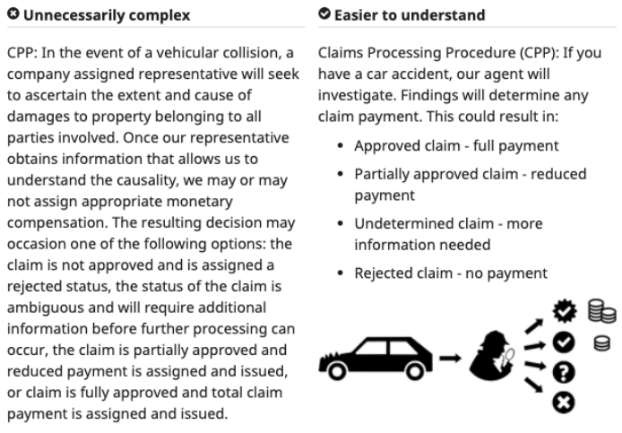
Look for simple words to communicate the message while staying true to the entity’s vision, mission and values.
Be human
Use pronouns like "we", "us" and "you".
Use long, confusing or jagon words
Additionally, the content should not be too playful, witty or sarcastic - for instance, using extremely technical ICT related words (e.g. proxy server and CSS are not commonly understood terms) can sound confusing and intimidating to a user.
Additionally, using too many cultural reference terms (aside from the ones understood such as Ahlan Wa Sahlan or Marhaba) can make the content seem irrelevant to a user who isn’t familiar with the UAE, so it would be ideal to keep these to a minimum.
Be specific about what you're communicating and keep it simple by keeping the content clear.
Be vague or use acronyms that users may not be familiar with.
Use active voice with positive words. E.g. "You have successfully logged in" rather than "The account has been logged into by you"
Use passive voice with negative words such as "can't" or "shouldn't". Try to find ways to rephrase the content to avoid sounding too negative.
Select a style of English, either British or American and implement it consistently across all web pages.
Mix both British and American. Despite being a common spoken language, there are differences in spelling that must be taken into consideration e.g. "Colour" and "Color".
Organise similar content smartly by grouping related ideas together.
Put two different ideas together in a single paragraph or sentence, or leave any content haphazard or unstructured.
Stay relevant to the title, add any specific links to related content when necessary.
When a user visits a particular section, they expect to find the answer they're looking for.
In order to create weighted content that is relevant and add credibility to the entity, add in specific links that relate to that content.
Stray too far from the title. If you find that you are going off-topic, you may need to create a separate but related section.
Strive for simplicity.
Be as clear as possible by using simple words and phrases.
Limit the number of sentences per paragraph along with any relevant information. Indicate where further details can be found (such as, "Our legal resources section explores this in greater detail").
Overload the sentence with too much information that will slow or frustrate the user.
Grammar and Punctuation
Acronyms
There is a chance that users might not recognise specific acronyms such as ICT. To avoid confusion, spell out the word when used the first time and then add the acronym in parentheses, such as Information Communication Technology (ICT). If the acronym is well known, such as HTML or API, use it without spelling it out.
Contractions
To keep the voice consistently formal, keep contractions to a minimum. Do not use emojis.
Numbers
Spell out a number when it begins in a sentence, for example:
Seventy percent of UAE’s population is happy with their lifestyle...
When denoting a numeric figure in the middle of a sentence, revert to the number, such as:
A recently conducted survey shows 70% of UAE residents are happy with…
Numbers over 3 digits should be denoted with commas, such as 1,000 or 200,000 and so on.
Capitalisation
Don’t capitalise random words in the middle of a sentence unless they are proper nouns. Some words are not capitalised in the middle of sentences, such as internet, email, online and website.
Always remember to use sentence case – capitalise the first letter of the word in any sentence.
Headings and sub-headings
There are 6 levels of heading, H1, H2, H3, H4 H5 and H6.
Organise your content with logical heading increments. They should be used in sequential order. You should not have an H3 without an H1 and H2.
The correct heading tag should be picked based on content hierarchy and SEO strategy. e.g.
H1: Buy a PlayStation 5
H2: What comes in the box?
H3: Reviews
H3: FAQs
H4: Other consoles
General tips
- Keep headings short and simple (Ideally less than 5 words).
- Use clear and simple language.
- Avoid punctuation "where possible", e.g. Full stops and semicolons.
- Use sentence case (Capitalise the first word, proper nouns, official titles, product names - Then lowercase everything else), e.g. "The Minster of Energy is visiting Dubai today".
Ordered lists
Use ordered lists for step-by-step instructions only.
Separate steps into logical chunks, with no more than two related actions per step (e.g. Open the ‘Downloads’ page and click on ‘Form XIV). When additional explanation or a screenshot is necessary, use a line break inside the list to add in this information.
Exclamation marks (!)
To keep in line with the corporate tone of voice, avoid exclamation points. Do not use them in error messages or alerts.
Question marks (?)
If there is a quote from a higher authority that is part of the content, the question marks go inside the quotation marks (“What do you think?“).
If a parenthetical (i.e. bracketed) text is part of a larger sentence such as “We are happy to assist (and advise) you on XXX”, the question mark falls outside the brackets.
If the bracketed sentence stands alone, the question mark falls inside the bracket, for instance, (What is the message you would like to convey?)
Quotation marks (“ “)
Use quotes to refer to words and direct quotations.
Full stops and commas go within the quotation marks. For the placement of question marks with regards to quotation marks, please see the “Question marks” section.
Commas (,)
When writing a list, use the Oxford comma, e.g. “We offer services such as X, Y, and Z (the Oxford comma is the comma that comes before ‘and’). If you are unsure, read the sentence out loud and use a comma wherever you find yourself taking a pause for breath.
Full stops (.)
Full stops go inside quotation marks and outside brackets when the bracketed sentence is part of a larger sentence.
“We offer advice (and assistance with building a business plan) tailored to your needs.”
Dashes and Hyphens
Use a hyphen (-) without spaces on either side to link words into a single phrase (such as words like all-round, expert-led guidance) or to indicate a span or range (e.g. Monday-Friday).
Use an em dash (—) without spaces on either side to place a divider between two relevant points in a sentence. A pair of em dashes can be used in place of commas to enhance readability. Note, however, that dashes are always more emphatic than commas.
“Even though the snack table at the party had plates full of doughnuts and cupcakes—Joe’s favourite desserts—he turned his head away so he could resist the temptation.”
Colons (:)
Use colons to symbolise a list.
We offer the following services:
- Proofreading
- Copy-writing
- Editing
- Writing Advice
A colon can also be used to join two related sentences.
“A college degree is still worth something: a recent survey revealed that college graduates earned roughly 60% more than those with only a high school diploma.”
Semicolons (;)
Go easy on the semicolons They usually support long, complex sentences that can easily be broken down with a conjunction or preposition (e.g. but) or separated using an em dash (—). Alternatively, the sentence could be simplified by splitting into two.
“The upperclassmen are permitted off-campus lunch; the underclassmen must remain on campus”
Ampersands (&)
Don’t use ampersands unless it is part of a company or a brand name.
Spell it out as "and" within any sentences.
“Johnson & Johnson”
URLs and Websites
Capitalise the names of websites and web publications, such as Health First or Google, unless their brand guidelines suggests otherwise.
Don't italicise.
Try to avoid displaying full URLs, but if you must make sure you include the protocol e.g. https://
Writing for accessibility
Users with different abilities may rely on text alternatives for visual or audio content. The below tips are good practice to help meet Web Content Accessibility Guidelines (WCAG) requirements.
1.
Provide informative, unique page titles
For each web page, provide a short title that describes the page content and distinguishes it from other pages.
The page title should stay consistent with the main heading of the page, unless this heading is a quote or a statement, in which case, the title should sum up the page contents so users know what to expect.
2.
Use headings to convey meaning and structure
Use short headings to group related paragraphs and clearly describe the sections. Good headings provide an outline of the content.
For instance, if your heading reads “Open Data”, the content of the page should show relevant links pertaining to open data or if you have a heading that reads “About The Founder”, then the page clearly illustrates details about the founder, their background and their present role in the entity.
3.
Make link text meaningful
Write link text so that it describes the content of the link target instead of using ambiguous text such as “click here” or “read more”. Indicate relevant information about the link target, such as “Read about our cookie policy” or “Open Tenders”.
4.
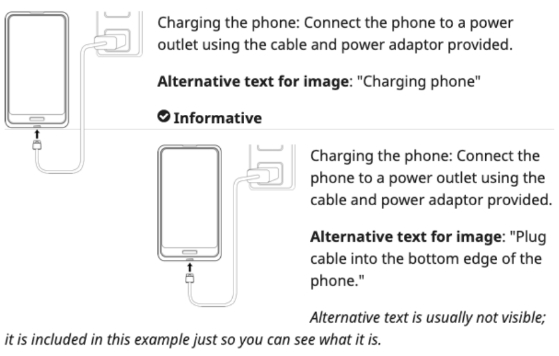
Write meaningful text alternatives for images
For every image, write alternative text that provides the information or function of the image. For decorative images, alternative text is not required.
An example is illustrated below:
5.
Create transcripts and captions for multimedia
For audio-only content, such as a podcast, provide a transcript.
For audio and visual content, such as training videos, provide closed captions and transcripts. Include spoken information and sounds in the audiovisual (AV) in the transcript such "door closing" or "end credits" so the content is understood. Include people’s names and indicate their actions, e.g. "Salah leaves the room".
6.
Provide clear instructions
Ensure that instructions, guidance and error messages are clear and easy to understand. Refrain from using technical language. For instance, “Password should be at least eight characters with at least one number (0-9) and one special character (!@£$%^&*).
Describe input requirements, such as date formats (DD/MM/YYYY).
7.
Keep content clear and concise
Make brevity your best friend when writing content. Use simple language and format in line with the context.
- Write in short, clear sentences and paragraphs - less is more.
- Avoid using unnecessarily complex words and phrases. Consider providing a glossary of terms users may not know that they can refer to to understand context.
- Expand acronyms on first use. For e.g. Web Content Accessibility Guidelines (WCAG).
- Consider using images, illustrations, video, audio and symbols to help clarify meaning.