
Typography System
Typography guidelines ensure that legibility is maximised through consistent application of fonts, font size, colours, etc. These guidelines will also help maintain clean content flow across the website by assigning specific functional roles to the different typography styles listed here.
Typefaces
Keeping personality, performance and legibility in mind, a Google font has been selected for English (Roboto) and currently, the most used font for Arabic (Droid Arabic Kufi).
Selecting these typefaces allows the websites to load faster as the servers will automatically send the smallest possible file to every user based on the technologies that their browser supports.
Personality
Universal,
Minimal,
Balanced.
English
Roboto
Five weights
Arabic
Droid Arabic Kufi
Two weights
Font stack
If primary typefaces fail to load, the following operating system typefaces get triggered by the server. In order to maintain consistency, ensure to communicate the following fallback fonts that the server should generate.
- ui-sans-serif
- system-ui
- -apple-system
- BlinkMacSystemFont
- sans-serif
- Apple Color Emoji
- Segoe UI Emoji
- Segoe UI Symbol
- Noto Color Emoji
For most systems this will look like:
Apple devices will often display San Francisco
Devices running Windows will often display Arial
Machines running Linux will often display the default sans-serif font for any running distribution
Font sizes
Once you receive your content, start creating a clear hierarchy with the help of different sizes. If you need to emphasize something further, then work with the font-weight and text colour.
Headings
We strive to be a leading organization
Level 1
Font size: 60px
Font weight: 500
Line height: 60px
We strive to be a leading organization
Level 2
Font size: 36px
Font weight: 500
Line height: 40px
We strive to be a leading organization
Level 3
Font size: 30px
Font weight: 400
Line height: 36px
We strive to be a leading organization
Level 4
Font size: 24px
Font weight: 400
Line height: 32px
We strive to be a leading organization
Level 5
Font size: 20px
Font weight: 400
Line height: 28px
Body Copy
Ensure the provision of telecommunications services throughout the country to meet the needs of those who wish to make use of such services
Level 1
Font size: 20px
Font weight: 400
Line height: 280px
Ensure the provision of telecommunications services throughout the country to meet the needs of those who wish to make use of such services
Level 2
Font size: 18px
Font weight: 400
Line height: 28px
Ensure the provision of telecommunications services throughout the country to meet the needs of those who wish to make use of such services
Level 3
Font size: 16px
Font weight: 400
Line height: 24px
Ensure the provision of telecommunications services throughout the country to meet the needs of those who wish to make use of such services
Level 4
Font size: 14px
Font weight: 400
Line height: 20px
Font weights
Font Weights allows you to add emphasis and differentiate specific pieces of text. For optimal performance, it’s recommended to limit the variations to 4-5. For clean consistency, it’s essential to make sure the weights visually match from Arabic to English.
المنظمة الرائدة
Regular
Font weight: 400
المنظمة الرائدة
Bold
Font weight: 700
When to use different weights
The font size table states to use heavier weights for heading and titles as these weights grab attention. Use lighter weights for body and long texts to help users read easily.
Do
Use heavier weights for heading and short-important titles.
Do
Use lighter weights for body copy and large quantities of text.
Typographic
Hierarchy
This is when it all comes together. Using size, weight, colour and alignment, typographic hierarchy establishes a priority order that allows the user to navigate seamlessly through the content.
Heading Level 2
Font size: 36px
Font weight: 500
Line height: 40px
Sustainability as a work culture
Body Copy Level 1
Font size: 20px
Font weight: 400
Line height: 280px
Sustainability is a part of our ethics and corporate culture as we work tirelessly to ensure our work environment supports growth and happiness.
Body Copy Level 3
Font size: 16px
Font weight: 400
Line height: 24px
In line with the UAE’s Telecommunication Law and its executive regulations, the objectives of the TDRA include ensuring adequate provision of telecommunication services throughout the country, developing service quality and variety and adhering to license terms whilst making sure service quality is maintained.
Application
The entities
goals and values
Corporate values
Pioneering
Lorem ipsum dolor sit amet, consectetur adipisicing elit. Eligendi, eum ex excepturi fugit inventore laborum maxime nam nihil nobis, officiis porro quaerat, quas quod quos rem rerum voluptatem voluptates voluptatibus.
Customer happiness
Lorem ipsum dolor sit amet, consectetur adipisicing elit. Eligendi, eum ex excepturi fugit inventore laborum maxime nam nihil nobis, officiis porro quaerat, quas quod quos rem rerum voluptatem voluptates voluptatibus.
Collaboration
Lorem ipsum dolor sit amet, consectetur adipisicing elit. Eligendi, eum ex excepturi fugit inventore laborum maxime nam nihil nobis, officiis porro quaerat, quas quod quos rem rerum voluptatem voluptates voluptatibus.
Strategic Goals
Lorem ipsum dolor sit amet, consectetur adipisicing elit. A at aut commodi deserunt doloremque eius explicabo, facilis, illo in magnam magni maiores neque, pariatur perferendis rerum saepe sed velit voluptas?
Lorem ipsum dolor sit amet, consectetur adipisicing elit. A at aut commodi deserunt doloremque eius explicabo, facilis, illo in magnam magni maiores neque, pariatur perferendis rerum saepe sed velit voluptas?
Lorem ipsum dolor sit amet, consectetur adipisicing elit. A at aut commodi deserunt doloremque eius explicabo, facilis, illo in magnam magni maiores neque, pariatur perferendis rerum saepe sed velit voluptas?
How to use
the typography system
Learn about each scale size and its application.
Heading Level 1
Used for headers and important section titles.
Heading Level 2
Used for section and card titles.
Heading Level 3
Used for card titles, tables, data visualisation, low priority or small titles.
Body Copy Level 1
High priority, medium length paragraphs.
Body Copy Level 2
Used for long paragraphs, card descriptions or low priority content.
Basic
Principles
Do
Create hierarchy
A good structure helps us to present important information clearly and users to find relevant information easily.
Don't
Use different fonts
Sticking to a single font is ideal for overall consistency in tone of voice, and legibility.
Don't
Pair high contrast text sizes
Keep the pairing sizes logical and avoid using a very large hero display text next to a very small body text.
Text formatting
Text formatting can be used to visually add clarity and adjust voice or meaning.
Do
Left align
Exceptions include Arabic.
Don't
Don’t use bold format when editing your content
Use the correct assigned font weight from the font size table instead.
Don't
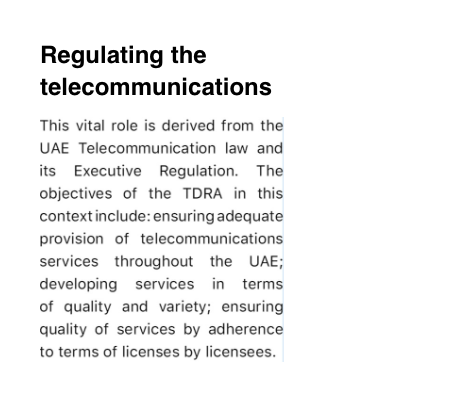
Justify text
Never justify text in either English or Arabic language as it slows down the reading speed by users.
Don't
Use underline for text
Underlined text is reserved for links and buttons.
Don't
Use indentation
Paragraphs indented with word spaces or tabs are hard to keep consistent. Use spacing to separate paragraphs.
Application guidelines


Line length
Readability is an important factor to consider when writing content. While line lengths are subjective and differ depending on context, we recommend keeping line length between 60 and 100 characters with acceptable spacing. Setting this precedent will help writers outline the content in a simple manner that will make the end-user experience more positive.
Readers may also have control over the layout width; meaning that a line length cannot always be specified. So it’s good practice to design for an ideal line length, and use responsive design techniques to anticipate different contexts.
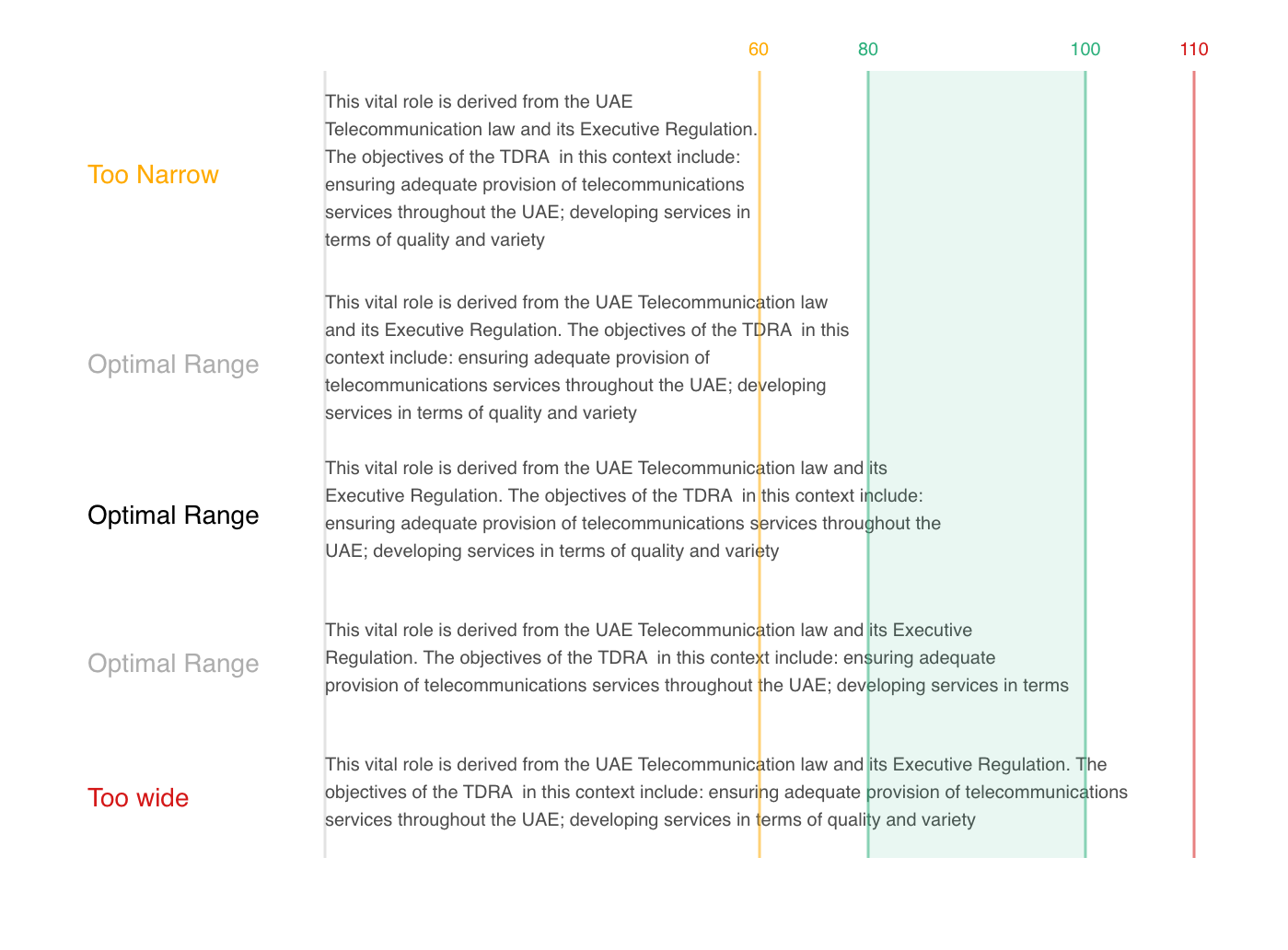
With a font size of 16px you can consider the maximum allowed width as a 768px container (Be careful, other sizes can't use this guideline).
Text colours
The minimum contrast ratio between text and the background is 4:1, avoid going for lower contrast and always work with higher contrast for better accessibility.
Black on White
Text
#000000
Background
#ffffff
Contrast ratio
21:1
Black text on white background contrast is 21:1 (highest contrast ratio). Use high contrast ratio (higher than 15 for most of the text in your layout.
See more information colours application in the colour system.
White on Black
Text
#ffffff
Background
#000000
Contrast ratio
21:1
White on black has the same contrast ratio (21:1), but it's better to avoid it when working on dark theme as it creates eye strain. Choose slightly lighter background and darker text colour to prevent this.
Learn more about dark mode in the templates page.
Larger texts (like Heading Level 1) can use lower contrast (at least 4:1 while smaller texts, like captions require higher ratio (at least 7:1) to stay readable.
UAE Gold 50 on White
Text
#b68a35
Background
#ffffff
Contrast ratio
3.14:1
UAE Gold 70 on White
Text
#7c5e24
Background
#ffffff
Contrast ratio
6.02:1
Do
Use colour for helper text or cards
You can use color for small-helper text and titles in the cards as long as the number of elements are limited (less than 5).
Use with caution
Minimize the colour usage for titles
Don't
Use colour for body text
Capitalisation
Do
The most important heading
You can use capitalised words for the most important message on the page.
Do
Uppercase short titles
You can use uppercase words for short titles.
Don't
Uppercase for lines longer than 3 words.
Don't uppercase full sentences or paragraphs as it impacts readability and can cause screen-readers to shout.
See more information within the tone of voice section.
Spacing
Spacing on the web does not work the same as spacing on print.
The content is placed centrally within the line, reserving additional space around the edges.
Line heights
Use with caution
Line heights may need adapting.
Line heights will need adapting between font size, quantity of text and print/web.
Do
Optimise line height
Make sure the line height is legible for each screen size and font size.
Don't
Make the line spacing too tight or too loose
Stay below 20% of tolerance from the optimal values.
Block spacing
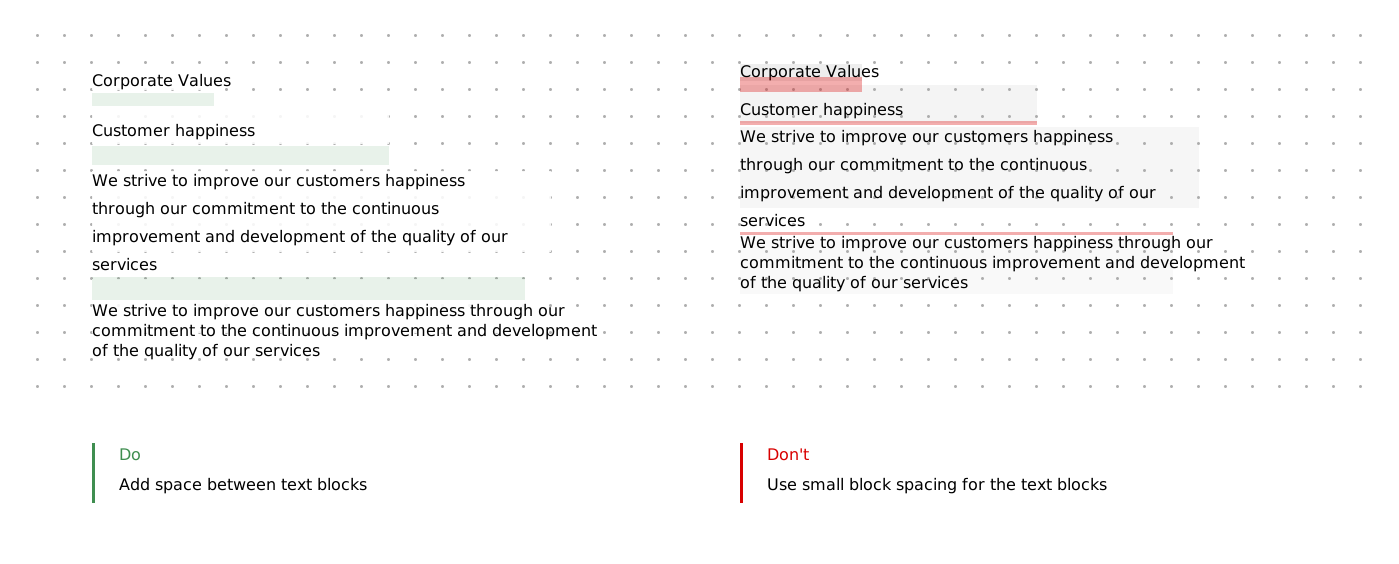
Text breathes too! Create enough white space between text blocks for better aesthetics and more digestible content - Remember the line height of the text reserves additional pixels!
Summary
1.
Stick to the font-size and font-weight table.
2.
Create hierarchy based on the content priority.
3.
Use appropriate spacing.